
- Data REST API
- New Modal and Embeddable charts
- Simplified Server-Side Configuration
- New Tag Based Charts
- Annotations
What a month! The team has been cranking away at some amazing new features that we are all very proud of - I hope you share my enthusiasm:
Data REST API
With the Silverline Data API you now have programmatic access to all of the monitoring data we store on your behalf. We're currently denoting it as beta while we solicit user feedback to iron out any potential issues. You can perform several different types of data queries such as all of the container data for a given server instance, all of the tag data for a given server instance, or all data for a specific tag across multiple server instances. Tying your data into your custom reports or billing systems is now only an API call away.
New Modal and Embeddable Charts
Remember last newsletter, when I announced "Beautiful Charts"? Well I think we have outdone ourselves again. Now, when you log in to the Silverline dashboard and you see your list of servers, clicking on one pulls up a modal window which gives your charts the attention they deserve. The menu bar can be concealed by clicking on the arrows in the top left hand corner to provide an uncluttered view of beautiful charts.
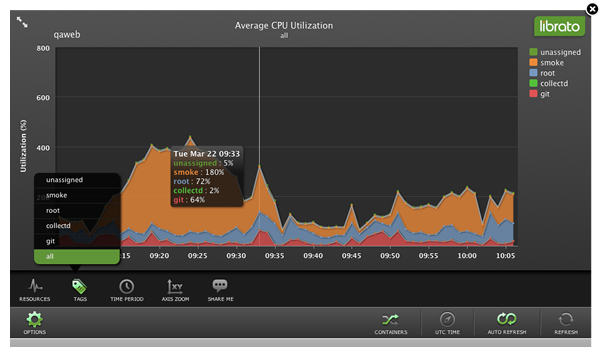
The best part is, the charts are now embeddable! Click on "options" then "share me" and you will see two options: a link and the ability to create HTML code that you can embed on your web site. Now you can create your own "Operations Center" with multiple Silverline charts. These charts are all implemented using the new Silverline Data API.
Simplified Server-Side Configuration
After extensive research on how people are using Silverline we decided to introduce a new environment variable SL_NAME that speeds up and simplifies the configuration of Silverline after install. Tagging an application is easily accomplished on the command line, in scripts, or even in /etc/inittab with a utility such as "env". To set the environment variable on the command line simply type:
% SL_NAME=foo <your app>Then login to the Silverline dashboard to monitor your application. Read our Knowledge Base article for more information on configuring your system after installation.
New Tag-Based Charts
Your Silverline dashboard can now show you a much more complete picture of your infrastructure. By default the new modal charts show you a new view: a stacked tag chart which shows you all tags on a server instance. Clicking on the container icon takes you to the stacked containers view with which you are already familiar.
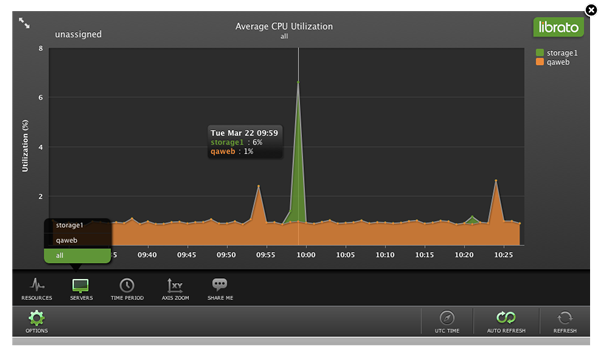
Under the "Monitoring Tags" section of the dashboard, clicking on a Tag will now show the breakdown of a single tag across multiple server instances in a scale-out tier, enabling you to easily gauge tier-wide consumption while detecting any anomalies amongst individual server instances. The following chart shows you the average CPU utilization for the 'unassigned' tag across two servers: qaweb and storage1:
Annotations
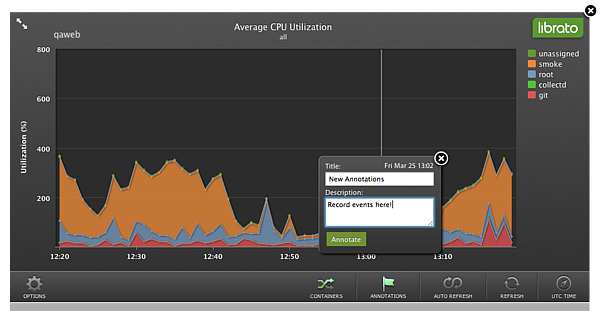
This is literally 'fresh off the press': we just released the ability to annotate graphs. Annotations will help you put the graph data into context. Just fired up new VMs? Pushed new code? Annotate your graphs.
Interested in more topics? Search our knowledge base, read our blog,follow us on twitter, or please tell us if you have ideas, comments or suggestions.
Thank you for your support!
Your Librato Silverline Team
www.librato.com